Hello and welcome to another blog by me! Lately I have been learning how to design systems that have to talk to each other: a web platform on one side, an external support desk on the other, and a lot of things that can go wrong in between. Before writing any code, the most useful tool I found was a wall (or a Miro board) full of coloured sticky notes. That tool is called Event Storming.
This post is the guide I wish I had when I started: what event storming is, what each sticky note means, how to run a session step by step with a real example, and the mistakes I made along the way.
TL;DR:
- Event storming is a workshop where you model a system as a timeline of things that happened (events), written on sticky notes
- Each colour has one meaning: events, commands, policies, aggregates, external systems, read models, hotspots
- You start with the happy path, then ask “what if…?” until the failure cases are on the board too
- The board maps almost one-to-one onto code, but it is the questions you ask on the way that make it valuable
What Is Event Storming?
Event storming is a workshop technique created by Alberto Brandolini. The idea is simple: instead of starting with database tables or class diagrams, you start with what happens in the business, described as events in the past tense:
Ticket Created Ticket Synced Ticket Closed
You put them on a wall in the order they happen, then gradually add why they happen and who or what causes them. Developers and the people who understand the business (often called domain experts) do this together, so everyone ends up with the same picture.
There are a few levels of event storming:
- Big Picture: the whole business, mostly just events. Good for finding where the boundaries and problems are.
- Process level: one process in detail, with commands, policies and people.
- Design level: detailed enough to turn into code, with aggregates and their rules.
This guide goes from the first to the last, using one small example.
Why Bother?
Because most bugs in systems that talk to each other are not typos. They are misunderstandings and forgotten cases:
- Two people mean different things by the same word (“closed” in our app vs “closed” in the support desk)
- Nobody asked what happens if the other system is down
- Nobody asked what happens if a request succeeds but the answer gets lost
Sticky notes are cheap. Moving one takes a second; changing a design after it is in production takes weeks. Event storming lets you find these problems while they are still sticky notes.
The Sticky Notes
Every colour has exactly one meaning. This is the legend I use:
| Sticky | Colour | Meaning | Example |
|---|---|---|---|
| Domain event | orange | Something that happened, past tense | Ticket Created |
| Command | blue | An intention: someone or something wants a change | Create Ticket |
| Actor | small yellow | The person who sends a command | User |
| Aggregate | pale yellow | The thing that decides if a command is allowed, and holds its rules | Ticket |
| Policy | purple | An automatic reaction: “whenever X, then Y” | Whenever a ticket is created, then send it to the support desk |
| External system | pink | Something outside your control | Zammad |
| Read model | green | Information someone looks at | Ticket list |
| Hotspot | red | A problem, risk or open question | What if the support desk is down? |
Teams vary a little, but if you stick to one legend and put it at the top of the board, nobody gets confused.
The stickies are not placed randomly; they follow a small grammar. Alberto Brandolini summarises it in one picture:
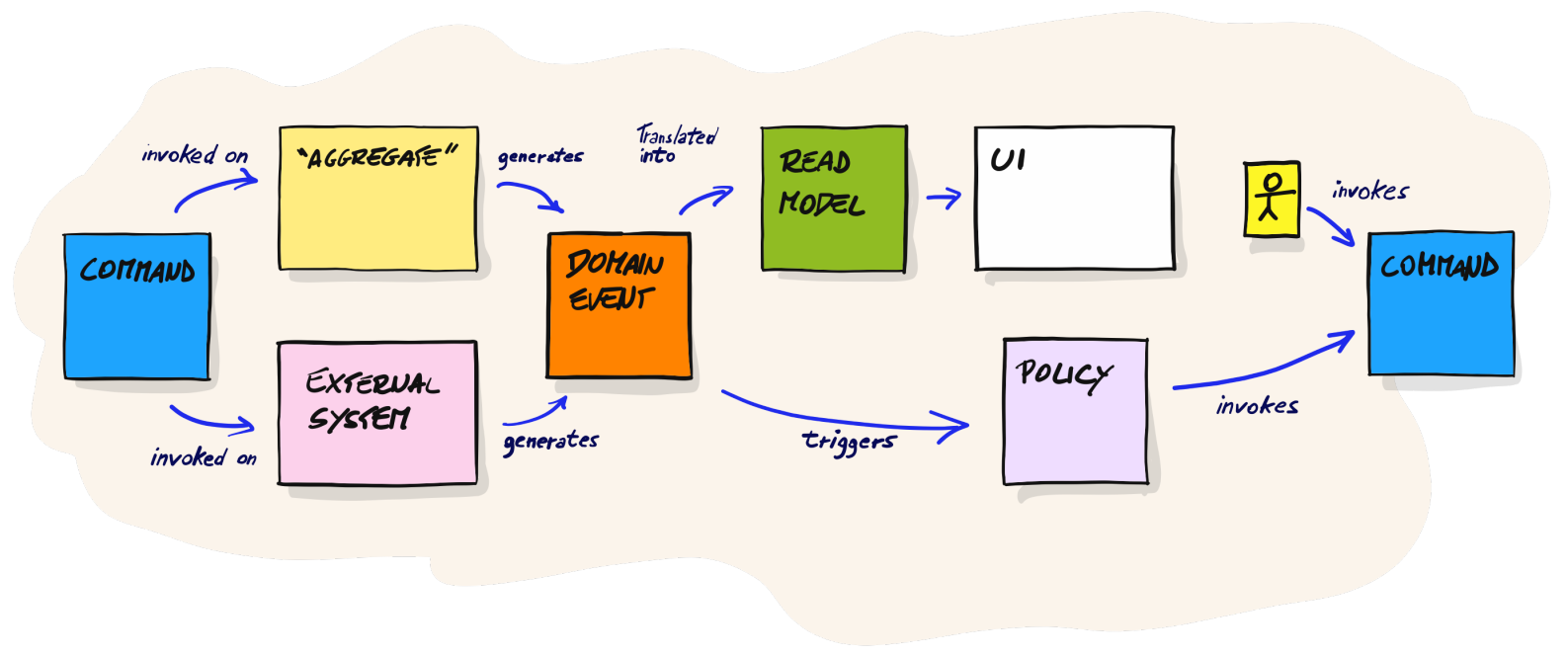
"The picture that explains everything", by Alberto Brandolini
Read it from left to right:
- A command is invoked on an aggregate (or an external system), which decides and generates a domain event
- The event is translated into a read model, which is what the UI shows
- The event also triggers a policy, which invokes the next command
- A user (actor) looking at the UI invokes commands too, and the cycle continues
Every flow in this post is just this loop, repeated.
The Example
Imagine a web platform where users can ask for help. The support team does not work inside the platform; they use an external helpdesk tool (in my case, Zammad). So when a user creates a ticket in the platform, it has to end up in the helpdesk.
Sounds like one HTTP call, right? Let’s see.
Step 1 — Write the Events
What you do: Everyone writes orange stickies with things that happen, in the past tense, and places them on a timeline from left to right. No discussion yet, no order arguments, just get them out.
Ticket Created → Ticket Synced
Why past tense: an event is a fact. “Ticket Created” cannot be undone or rejected; it already happened. That makes events the most stable thing to build a model around.
Then walk the timeline from left to right and ask: “is anything missing between these two?” Here, someone will ask: “What if sending it to the helpdesk fails?” and a new event appears:
Ticket Created → Ticket Synced or Ticket Sync Failed
Step 2 — Mark the Hotspots
What you do: Every time a question comes up that nobody can answer right now, write it on a red sticky and put it where it belongs. Then keep going.
What happens to the user's ticket if the helpdesk is down for 10 minutes?
Why: event storming sessions die when the group tries to solve every problem on the spot. Hotspots let you capture the problem and come back to it later. At the end of the session, the red stickies are your to-do list.
Step 3 — Add Commands and Actors
What you do: For each event, ask “what caused this?” and put a blue command in front of it, and a small yellow actor in front of the command if a person triggers it.
User → Create Ticket → Ticket Created
Why: a command is a request, and requests can be refused (the title is empty, the user is not allowed). An event is what happened after the request was accepted. Keeping the two apart makes it obvious where the rules live.
Step 4 — Add Policies
Not every event is caused by a person. “Ticket Synced” happens because the system reacts to “Ticket Created”. That reaction is a policy, and the easiest way to write one is:
Whenever [event], then [command].
Ticket Created → Whenever a ticket is created, then create it in the helpdesk → Zammad → Mark Ticket As Synced → Ticket Synced
Why policies matter: an event cannot do anything by itself; it is just a fact. Something has to listen for it and decide what happens next. Writing that “something” on the board makes the hidden automation visible, and in code it becomes an event handler.
One policy or several? This confused me for a while. The test that finally worked for me: look at what changes at the end. If every path of a reaction ends by changing the same thing, it is one policy with several steps (like “look in my pocket, then on the table, then take the spare key”, which is still just “get my keys”). If different paths change different things, they are separate policies.
Step 5 — Add External Systems
What you do: Put a pink sticky for every system you do not control, where your flow touches it.
Why: this is where most of the danger is. Your own code you can fix; an external system can be slow, down, or behave in ways you did not expect. Every pink sticky deserves a few “what if” questions (see Step 7).
Step 6 — Find the Aggregates
What you do: Look at the commands and ask “which thing decides whether this is allowed?”. Write that thing on a big pale-yellow sticky, together with its rules.
Ticket
title: 3–50 characters
sync status: pending → synced | failed
a failed ticket is final
a synced ticket cannot be linked to a different helpdesk ticket
Why: the aggregate is where the business rules live, in one place. A useful rule of thumb: one command changes one aggregate. If a command seems to need to change two things at the same instant, either they belong together, or one of them can happen a moment later through a policy.
Also notice the state “pending”. Instead of making the user wait while we call the helpdesk, we save the ticket immediately as pending, show “Submitting…”, and update it when the helpdesk answers. Pending states like this are how systems stay responsive when another system is slow or down.
Step 7 — Ask “What If?” Until It Hurts
This is the step that turns a nice drawing into a design that survives production. Go through every sticky and ask:
| Sticky | Questions |
|---|---|
| Aggregate | What are its rules? What is rejected, and in which state? Which states are final? |
| Command | What if it arrives twice? What if the thing it targets does not exist? |
| Event | Does anything react to it, or does it only update a screen? What data does it carry? |
| External system | What if it is down? What if it succeeds but the answer is lost? What if it answers twice? |
| Policy | What if it fails halfway? Is it safe to retry? Does it check the current state first? |
The question that taught me the most was the lost response:
- We send “create ticket” to the helpdesk
- The helpdesk creates ticket #50
- Its answer never reaches us (timeout, network blip)
- We retry, and the helpdesk creates ticket #51
Now the customer has two tickets. The fix is to send our own ticket ID along with the request and search for it before creating, so a retry finds #50 instead of creating #51. You only find problems like this by asking the questions on purpose.
Mistakes I Made
Writing events like commands. “Create Ticket” on an orange sticky is a command. Events are past tense: “Ticket Created”.
Turning the board into a flowchart. I started drawing decision diamonds for every HTTP status code (2xx?, exact match?). The board became a picture of my code instead of the business. Event storming has no diamonds: put simple conditions in the policy text (“whenever a ticket is created and the user is not linked…”), and give important outcomes their own event (“Customer Link Conflicted”). Technical details belong in the code.
Using different words for the same thing. I had “user synced”, “customer linked” and “support user” all meaning the same thing. Pick one word per concept and use it on the board, in conversations and in the code. DDD calls this the ubiquitous language.
Trying to solve everything at once. Red hotspots exist so you can park a question and move on. Use them.
From Board to Code
Once the board is stable, it maps surprisingly directly onto code:
| Sticky | Becomes |
|---|---|
| Aggregate + rules | A domain object with methods that accept or reject changes |
| Command | A command handler (load the aggregate, call a method, save) |
| Event | A recorded fact, and a message if something reacts to it |
| Policy | An event handler that sends the next command |
| External system | An interface (port) plus an adapter that talks to the real API |
| Read model | A query shaped for the screen that shows it |
The questions from Step 7 become test cases. Written as Given / When / Then scenarios, they are readable by non-developers too:
Scenario: A failed ticket cannot be synced later
  Given a ticket whose sync failed
  When the helpdesk confirms the ticket
  Then the confirmation is rejected
  And the ticket stays failed
Summary
- Start with events in the past tense, on a timeline
- Add commands, actors, policies and external systems to explain why each event happens
- Find the aggregates and write their rules on the board
- Park open questions as hotspots instead of solving them on the spot
- Ask “what if?” for every sticky, especially the external ones
- Keep the board about the business, not about HTTP status codes
You do not need special software: a wall, a pack of sticky notes and the right people are enough. A Miro board works just as well for remote teams.
Resources
- Alberto Brandolini, Introducing EventStorming (Leanpub), the original book by the creator of the technique
- eventstorming.com
- Khalil Stemmler, SOLID: The Software Design and Architecture Handbook, chapter 16 “Learning the Domain”
Thanks for reading! In a next post I want to show the other half of this story: what happens when you actually build that ticket flow and break it on purpose.